Summary panels
Introduction
A summary is a real, stateful component. It can contain links, inputs, buttons and ordinary semantic content. Moving its presentation must not replace its live DOM with a screenshot or a second component instance.
BrandStageShell owns the persistent summary renderer. Route pages provide placement
slots and data. The default summary uses the element title, optional eyebrow, features and action.
Define a custom synchronous snippet in the persistent brand layout when the default does not fit
your content:
<BrandStageShell {theme}>
  {#snippet summary(context)}<CustomSummary {...context} />{/snippet}
  {@render children()}
</BrandStageShell>
The snippet receives mode (detail or carousel), heading, contentInset, element data and endpoint-address support.
Keep initial output synchronous and content-only. Layout, frame and surface belong to the
framework. Do not add a competing fixed-position outer panel.
For example, CustomSummary.svelte can register its real title as a shared endpoint:
<script lang="ts">
  import { createCatalogEndpointAction, type SpatialSummaryContext } from '@spatial-elements/sveltekit';
  let { spatialElement, heading, address }: SpatialSummaryContext = $props();
  const catalogEndpoint = createCatalogEndpointAction();
</script>

<div class="custom-summary">
  <svelte:element this={heading} use:catalogEndpoint={address('title')}
    id={heading === 'h1' ? 'spatial-element-title' : undefined}
    tabindex={heading === 'h1' ? -1 : undefined}>
    {spatialElement.title}
  </svelte:element>
  <p>Custom content for {spatialElement.title}.</p>
</div>
Create the action inside this child component, which is instantiated under the persistent
summary host. Creating it in the outer layout before BrandStageShell cannot read
the child's endpoint context. Register only roles that actually exist in the custom content; missing
roles use the normal fallback instead of pretending a different DOM element is the matching title
or action.
The framework already applies contentInset; do not add it a second time to the
snippet. The detail heading keeps id="spatial-element-title" so the surrounding
panel's accessible label resolves correctly.
Natural height and responsive content
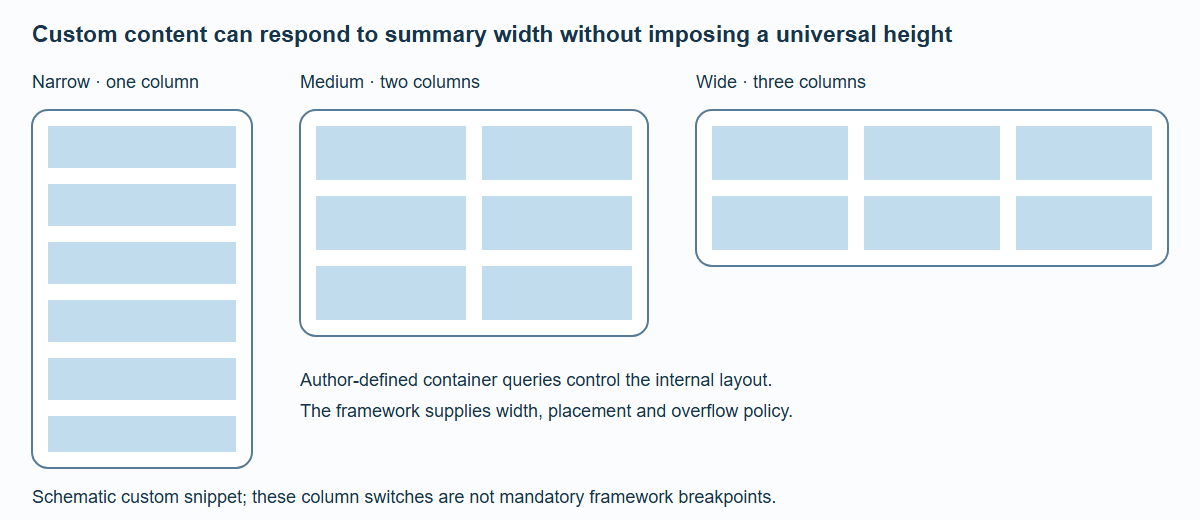
A custom snippet chooses its own container-query columns. The framework does not prescribe these internal breakpoints or equalize panel heights.
The framework knows the summary's width and anchor. Text determines a detail summary's natural height. Wide flow detail summaries cap local overflow to the hero area; mobile and 3XL detail summaries contribute their real height to document flow. Custom content can use container queries to choose one, two or three internal columns based on the actual summary width.
The default summary defines its own 24px body line height so moving from a Section into the detail layer does not change its height. Custom snippets should likewise own their typography instead of depending on styles inherited from the surrounding page. The heading and primary action have their own explicit type rules.
Compact carousel summaries are different: below 840px they show framework-owned title/eyebrow strips of 40px or 66px and hide the full custom-summary content. Do not put an essential action exclusively in that hidden compact presentation.
From M through 2XL, carousel and detail use the same property content and natural panel
height. An optional summary.sectionLink is navigation below the carousel surface;
it adds no row or reserved height to the shared panel. The arrow at the top right opens the detail
page. Overflow inside a tall panel chains back to document scrolling at its boundaries, including
touch gestures.
Height can change when a font or late content arrives. Those changes trigger layout invalidation; they are not a reason to measure every frame. Keep media dimensions reserved when possible. Arbitrary external font changes during an animation are still a real layout change and must be tested rather than assumed invisible.
Ownership and transition boundaries
The persistent host gives a summary a lifetime beyond a route's placement node. Placement and ownership are different responsibilities: manually reparenting a route-owned Svelte subtree does not prevent the route from destroying it.
The isolated /proof/persistent-summary fixture demonstrates DOM identity, input value,
focus, effects and exactly one cleanup across ownership changes. Production carousel-to-detail
and detail-to-carousel navigation retain the live summary independently of visual-transition eligibility,
including reduced motion. The ordinary transition captures its decorative actors first, holds
the live root through route teardown, then adopts that root before measuring the destination panel.
Staged-navigation handoff uses the same host with its own motion and cancellation lifecycle.
This separation keeps the user's ongoing interaction intact and avoids rendering two copies of the same form during a visual handoff.